






Creating a trade show experience in a digital environment is a complex undertaking to say the least. The new technology requires a lot of planning and demands a fairly sophisticated webinar platform and mature webinar marketing program.
But there’s a lot of potential upside to running such an event. First, it easily helps you to reach more audiences than you’d be able to in person, which is great for any enterprise. Second, it helps you collect and analyze every interaction — helping you to gain further insights into your audience and drive revenue. Third and finally, they just look cool.
There are a few prerequisites to meet before creating a virtual trade show with webinars. So, it helps to have the following resources handy for at least your first foray into the live digital trade show experience:
Tools
-
- A sophisticated webinar platform.
- Design skills and tools.
- Video editing software and skills.
- A project manager or management tool.
Personnel
-
- Demand Generation Specialist.
- Design Specialist.
- Webinar Producer.
- Webinar Presenter.
- Sales Representative.
Process
-
- A content calendar.
- An experience map for the event.
- A content brief.
- Scheduled practice time.
- A list of CTAs and interactive features you’d like to include.Think your product is too big or small to show off in a webinar? Think again. See how one firm showcases its physical products — and trains its audience in the process — with webinars. [Watch Now]
Before you run a trade show experience, you’ll need to dedicate some time to planning. During this phase, you’ll need to sit down with your team to discuss roles, responsibilities, design needs and more, so everything can run smoothly.
We recommend you start with your timeline. Generally, start your planning at least a month ahead of your first virtual trade show experience. You will need at least two weeks for design alone — from ideating to lining up final assets — and you should plan to practice at least twice before going live – so bear this in mind.
Develop a trade show Theme

Make sure audiences know they’re entering a whole new experience with a well-defined theme that carries through to your design and tone.
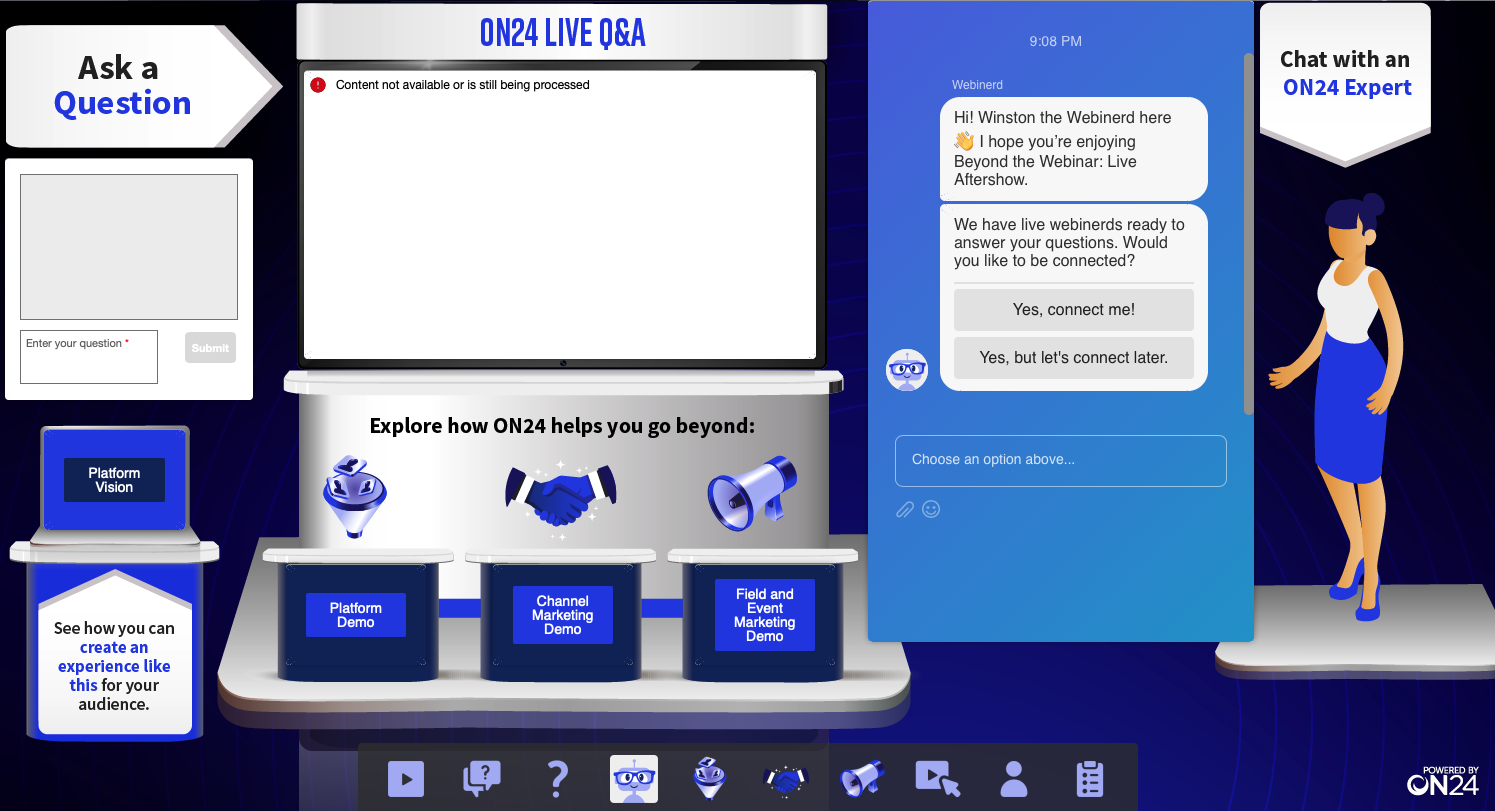
At ON24, we created “Beyond the Webinar,” a virtual trade show showcasing the breadth of what the ON24 platform has to offer. We wanted to carry that theme through and decided to emulate the experience you’d get at trade shows. So, we created a virtual booth that attendees could visit and interact with.
Take a look at the virtual booth console below:
Indeed, each company’s needs may be different. So, regardless of whether you’re looking to create a virtual booth, a virtual exhibit or plan to use digital experiences to amplify your hybrid events, sit down with your event organizer and establish a few goals that you can use to inform your theme.
After settling on a theme, it’s time to map out how your trade show should flow.
Identify Your Trade Show Elements

Trade shows usually follow a familiar format: attendees arrive, attend a keynote presentation and then either break out into different rooms for in-depth discussions or hit the trade show floor to see what solutions are available and talk to vendors.
Translating the trade show experience into a digital environment means cutting everything down to the bare essentials for a particular audience. At ON24, we decided there would be two main groups of attendees — prospects and customers — to create experiences for.
So, what elements did we include to target these two audiences? Fortunately, there is a good deal of overlap between the two. We settled on a flow like this:
1. Beyond the Webinar Mainstage
2. Beyond the Webinar Aftershow
Aftershow for Prospects
Aftershow for Customers
3. Use case Experiences
If we were to compare our virtual trade show experience to a user conference, then the “Beyond the Webinar Mainstage” would be the keynote speech and the “Beyond the Webinar Aftershow” would be the exhibitor booth.
Now, those two main elements — the mainstage and aftershows — have a lot of dependencies to consider. If you’re thinking of emulating this experience, sit down and ask yourself a few questions, like:
-
- What assets and/or resources do you have available for your experience?
- What branded content will you include in the keynote over the aftershow?
- How will you get attendees from the mainstage area into your aftershow experiences?
- How will you segment audiences into their respective experiences?
- What interactive features will you include in your mainstage experience? Your aftershow?
- How will you involve your sales team in the process?
- How will you use this experience to inform future content?
- Who on your team will do what during the event?
- How will you track success and what KPIs are you aiming for?
As you can see, the questions you’ll need to answer can become fairly complex fairly quickly. So, it’s in your best interest to plan out your experience as far in advance as possible.
For us, we wanted to get as close to a trade show experience as possible, so we set aside some of our marketing experts to answer questions during the Aftershow Experience through a live Q&A.
We also teamed up with our sales department to have a few sales representatives on standby to answer any in-depth questions an interested attendee might have. They were also on standby to book virtual meetings for anyone ready to convert on the spot. To do this, we made use of our platform integration with the Drift chatbot.
For our experience, the overall flow of the conference program for an attendee is:
-
- Register.
- Join the live mainstage event.
- Join the Aftershow Experience.
- Click through to a Use Case Journey.
- Interact with the sales team.
- Either leave the experience or set up a meeting.
So you can see that while the flow is fairly short, there are a lot of dependencies we need to accommodate. A quick rundown shows us the scale of what’s necessary:
-
- Keynote presentation and slides.
- Engagement tools and downloadable resources.
- CTAs driving to Aftershow Experience.
- Aftershow Experience layout and CTAs.
- Use Case Experiences.
- Chatbot playbooks.
- Sales training.
That’s a lot of stuff to prepare! Fortunately, you’ll nail your virtual trade show with a great plan.
Develop Your Plan

Virtual trade show planning may seem intimidating, but when you break it down to its constituent parts, it’s not too bad. Here’s how we recommend you approach your digital event planning at ON24:
Nail Experience Flow
First, make sure your marketing team agrees on the essential elements of your trade show experience. This should take place about a month or two in advance of your planned launch date.
We’ve mapped out a few trade show elements above, but, in general, you’ll want to focus on three core items:
-
- A main keynote experience.
- A post-keynote activity.
- Breakout options for sales and high-signal prospects.
Talk with your team and come up with a few ideas for your keynote topic. You’ll also want to discuss what you want your post-keynote experience to cover and if you’ll want to segment your audience for post-keynote experiences.
Create Experience Maps
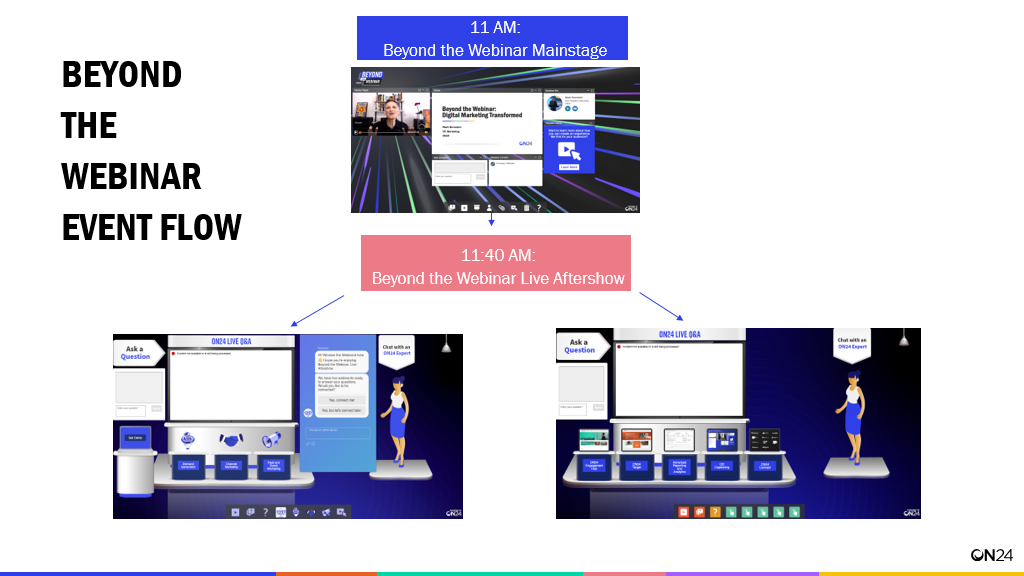
One way of keeping on track — and making sense of all of your different environments — is to create a set of experience maps. The first maps should be a representation of your event’s flow.
This does not have to be an especially complicated map. In reality, a simple slide will suffice.
For example:
That’s one map. But you should also have a map highlighting all the areas within an interactive environment that an attendee can click and interact with. For example, here’s a map of one of our “Beyond the Webinar: Live Aftershow Experiences” with interactive features highlighted.
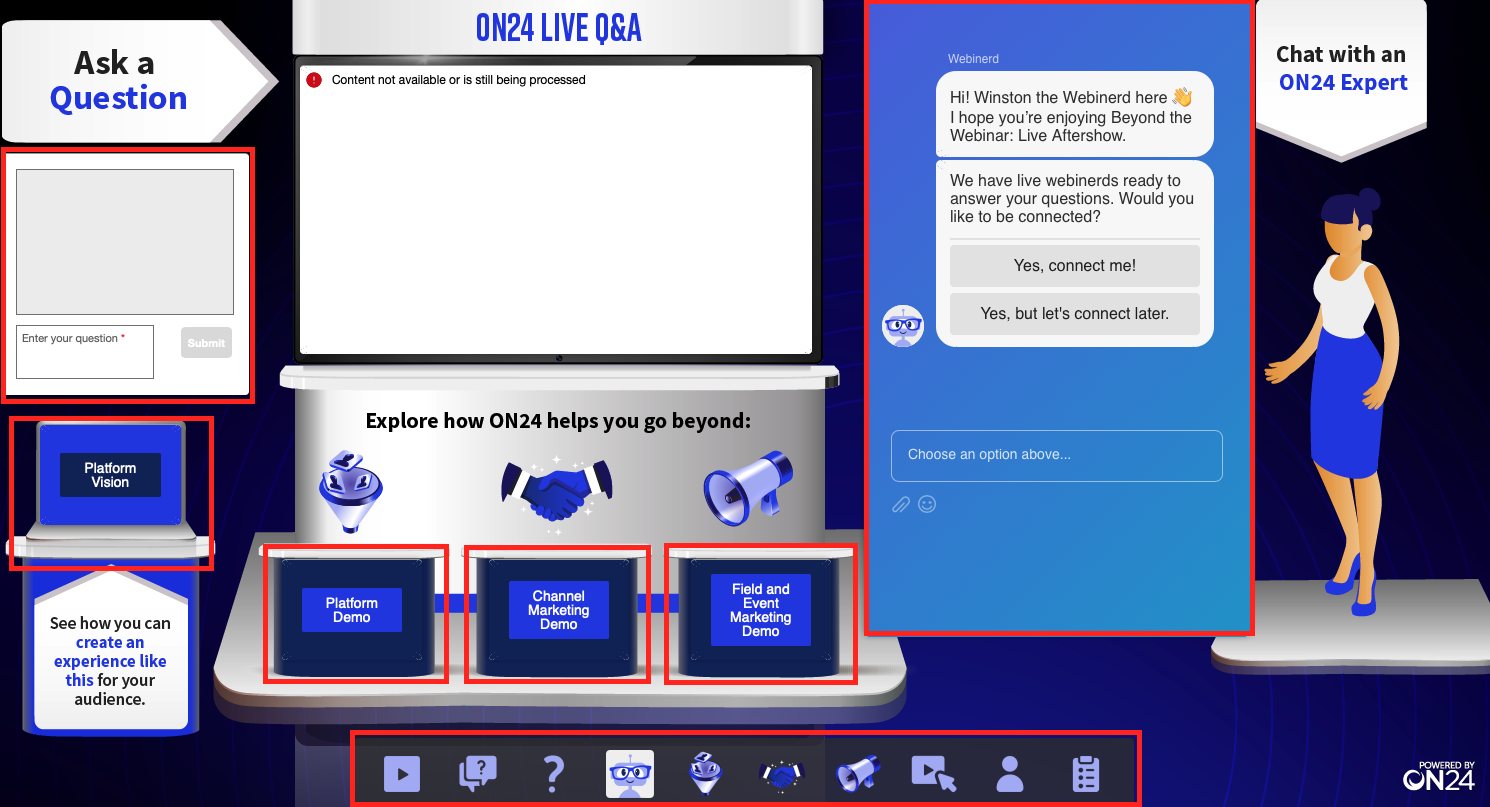
In it, you can see all elements an attendee can click on. To create your own map, simply create a blank slide and fill it in with the interactive elements you’d like to include: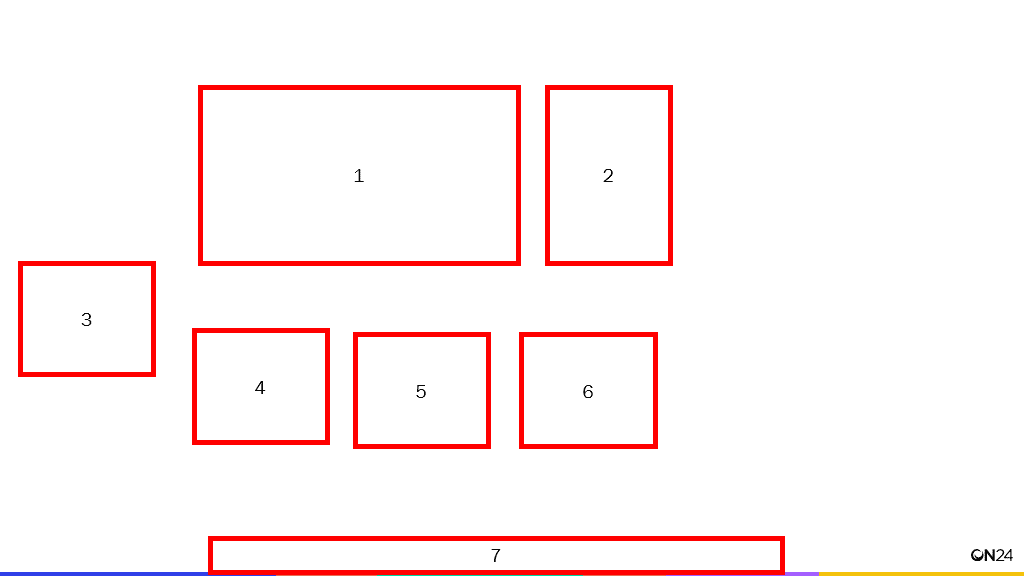
For the above example, these elements would translate to:
-
- Media player
- Chat
- Q&A
- CTA 1
- CTA 2
- CTA 3
- Engagement Tool Bar
Having this map will help your design team get a better understanding of what they have to work with and help your webinar production team know where they need to place each element.
Set Up The trade show Experience
Okay. So you have your console map, a theme and design figured out. Now, it’s time to set up your experience. Fortunately, this is fairly easy to do, especially once all of your design pieces are in place.
Here’s what you’ll need to do.
Step 1. Create a new webinar.
Log into ON24 Webcast Elite and click on “Create a Webcast+”

Enter all of the information — from title to time to campaign code — you’ll need. If you’re asking the audience to go from one live event to your new experience, you should schedule your experience to go live two to three minutes before the first event ends.
Step 2. Upload your console background
Go to Console Builder and click on “Console Customization” (the gear icon) in the Console Builder Bar.

Now, under “Console Background,” click on the “image” selection and upload the console background.
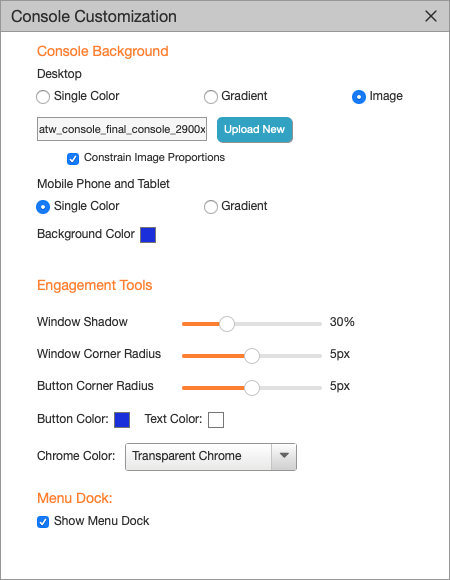
You’ll also want to click on “Constrain Image Proportions” to ensure your console background does not stretch and change clickable elements if an attendee decides to expand your experience.
Step 3. Create and place transparent images
Okay, now it’s time to create what your audience will actually click on. To do this, we’ll make use of transparent, clickable images.
- Click on the “Tools Manager” in the Webcast Elite Console Builder Bar.
- Scroll down to the “Image” tool under “Engagement.”
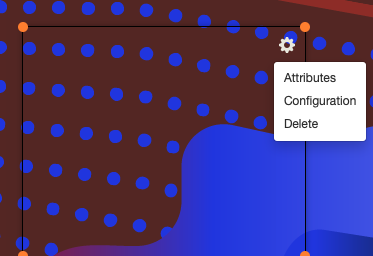
- Add the image and adjust its size using the four corner dots.
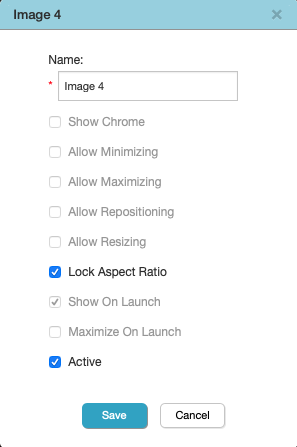
- If you need your transparent image to not be locked to an aspect ratio (as in, you want the transparent image to be a rectangle rather than a square), then click on the gear icon in the upper-righthand corner or your image, select “attributes” and deselect “Lock Aspect Ratio.”
- Make sure transparent images are marked to be “active” and “show on launch.”
- If your experience goal is to link to new experiences or provide CTAs, make sure your transparent images link to your destination.
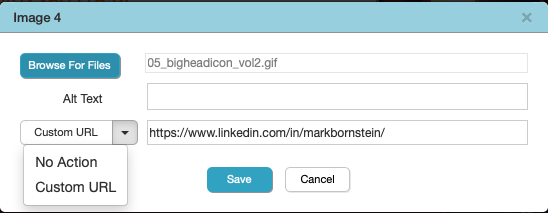
- Click the gear icon on your transparent images and then click on “configuration.”
- From the drop-down menu, select “custom URL.”
- Enter your destination URL into the field.
- Click “save.”
And that’s about it! Simple right? Your trade show experience is set up and ready to go. All that’s left now is to actually run it.
Schedule Practice
But before you run your live event, we recommend having one or two practice runs to make sure everyone who is touching this event knows where they need to be and when.
Usually, this means coordinating between two teams: your marketing team and your sales team, keeping everyone in the loop.
Members on your marketing team will likely fall under one of two roles: presenter or producer. If a team member is a presenter, then make sure their presentation is ready a few days before the event.
Have your presenters run through the event once or twice, making sure they know how to move from environment to environment and how to navigate the backend of a webinar.
Your producers — the marketing team members queuing up videos, slides and questions from the audience — should also be on the same dry run so they can identify any potential issues with the setup or uploaded media and practice queuing up questions to presenters.
Your sales team will have a different — but similarly crucial — role in the event: they’ll directly interact with your attendees.
How sales actually interact with your attendees depends on how you set up your event. With ON24, you can create unique CTAs that’ll connect attendees to salespeople via email, use Q&As to direct questions to your sales team and more.
For our “Beyond the Webinar: Live Aftershow” event, we used our integration with a Drift chatbot to facilitate a live 1:1 conversation like you would at a physical event.
Regardless of your approach, create a brief for your sales team and run them through the event at least once.
Run the Event

Running an immersive experience, like a virtual trade show, will take a degree of coordination — especially if you’re pushing from a live webinar.
If you’re going to push attendees from a live webinar to an immersive experience, you’ll need to do three things:
-
Create a Pop Up CTA
Your host should make references to your post-webinar experience throughout the live event. Still, your audience will need to click through a CTA to enter the actual post-keynote event.
With Webcast Elite, you can create a “Pop Up” call to action banner. What this does is simply have a “Take Action” Engagement Tool pop up towards the end of an event to encourage your attendees to take the next step in their content journey.
You’ll need to do this during your initial setup for your keynote event. You’ll need to select the “Take Action” tool from the Tools Manager, which can be found in the Console Builder bar.
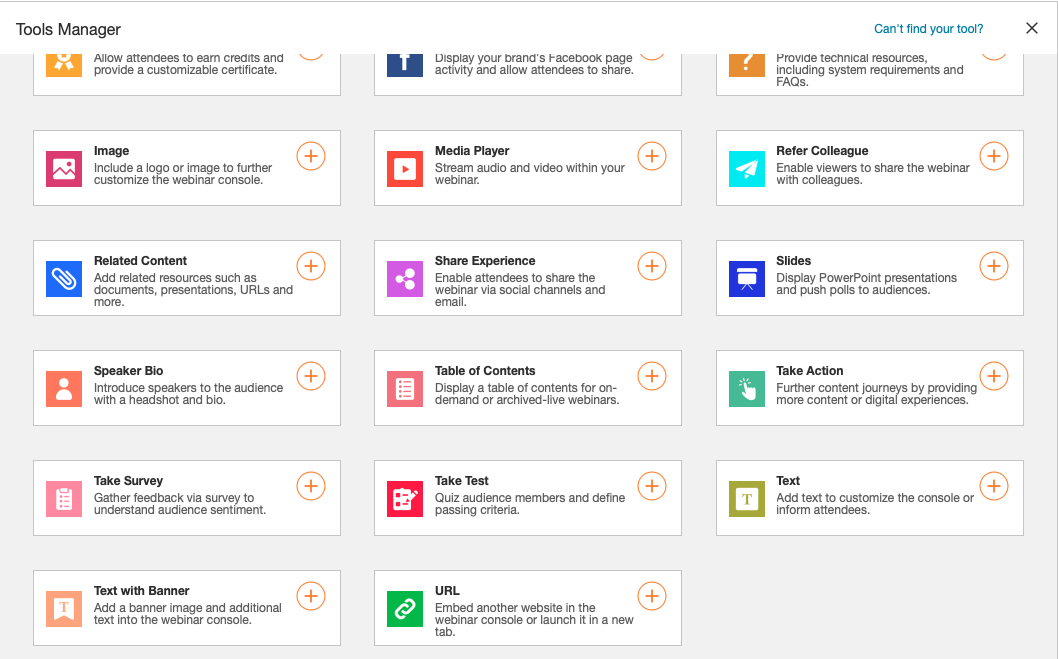
Under “Configuration” click on “Show automatically on webcast end.” Once selected, upload your image and enter your CTA Text.
After the copy is entered, go down to “Button Action” and select “Webcast” from the dropdown menu. Then enter your immersive event’s audience URL in the “Audience URL” field.
As a side note: make sure the CTA matches the theme and tone of your immersive experience – you’ll want to make sure your audience knows it’s a brand-new event.
2. Provide Some Time
Your audience will need time to move from your live webinar to your post-keynote event. In some cases, your presenter will also need time to move from the live keynote experience to a new post-keynote experience.
To create a buffer, set your post-keynote experience to go live two to three minutes before the end of your live event. This will ensure the post-keynote experience is both live and that attendees can start logging in.
Once your post-keynote event is live, set expectations by providing a countdown to when it formally starts.
At ON24, we’ve used a pre-roll clip before an “After the Webinar” experience that counts down to the show’s beginning and allows us to list out the different activities participants can engage in — like Q&A and group chat.
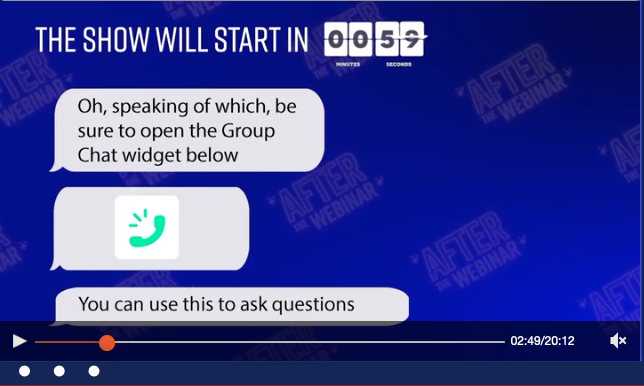
With a countdown in place, you should have enough time to get your presenter from one event to another and fill out the number of participants in the post-keynote experience.
3. Change up your pacing.
Most post-keynote experiences will have a different tone and emotion to set, so change up your presentation pacing, or Q&A style, to hit that different note. For example, in “After the Webinar” Mark Bornstein, our event host, takes a tea break — complete with a Tea Cam.
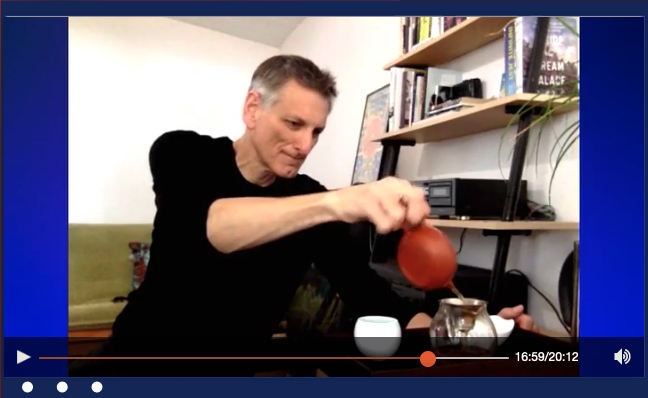
For complex scenarios like this, you’ll need to have a producer to ensure the post-event experience goes smoothly. Set aside some time between your presenter and producer to practice transitions and queuing up questions to make sure the live event goes smoothly.
A quick note on Q&A v. Group Chat:
ON24’s Q&A and Group Chat Engagement Tools can help make responding to your audience a lot easier — so long as they’re used right. Designate a sales or marketing representative to monitor the Q&A and leave group chat to your audience. This way, you can have a team member capture and raise solid questions to the presenter without having to navigate an overwhelming chat log.
Enjoy the Experience
Okay! So your post-keynote experience is up and running — now it’s time to engage. Make sure your presenter lists out housekeeping items like calling out specific CTAs and activities before diving into the meat of the post-event experience.
When the event is finally over, make sure you meet with your respective teams to consolidate feedback and plan your next event.
It should be smooth sailing from here on out. Treat the rest of the post-event experience like a normal webinar and have fun!
A few savvy companies made the pivot from physical trade shows to digital trade shows. It may sound like a huge undertaking, but it’s not as hard as you think. Let’s take a look at how two companies organized virtual trade shows and some tips on what you can do to run a stellar trade show of your own.
RevGrowth 2020 by Drift
In early 2020, Drift, a conversational marketing company that creates messaging software for businesses, postponed its annual HYPERGROWTH conference and watched as more events were canceled or postponed week after week.
The team at Drift quickly realized the endless string of canceled events was creating a pipeline gap like no other, but not just for them. It was happening to many of their business partners and customers too. Because of this, Drift decided to collaborate with a few business partners to reinvent events for 2020.
Enter RevGrowth 2020: two days of marketing and sales content with 8,500+ participants presented by 19 different companies.
It took Drift and its partners a month to set up the virtual event, and they share a breadth of information about how they did it in a great article here. We want to take a closer look at the details of the event and what they did to closely replicate a physical event.
Get our in-depth guide on planning and producing a virtual event when you click this link.
Speakers and Breakout Sessions
The two-day virtual conference, facilitated by ON24’s virtual conference platform, offered participants two tracks of content to follow: marketing and sales. Like any good conference, RevGrowth 2020 had plenty of speakers and breakout sessions on both topics for attendees to tune in to. Let’s take a look at what was covered:
Marketing
The marketing track owned the first day of the RevGrowth conference. Things kicked off with a keynote address by Huib van Bockel, founder of TENZING Natural Energy and former CMO of Redbull Europe. He spoke about why being a social brand is more important than ever.
The marketing track ran from 10 a.m. to 6 p.m. and featured presentations on 12 topics from companies like RollWorks, Demandbase, Tray.io, Sendoso, and more. The schedule included two built-in breaks and a lunch exercise session. Participants could join two virtual workout classes: HIIT and yoga.
Sales
The second day of the conference was reserved for the sales track and began with a keynote address from Steven Bartlett, CEO of Social Chain. Steven spoke about The State of Social.
The sales track ran from 10 a.m. to 3:45 p.m. and featured eight presentations by professionals from G2, Showpad, Gong.io, ON24, Drift, and more. The sales day also included built-in breaks and a lunchtime virtual workout.
Closing Events
The remainder of the second day featured RevGrowth closing ceremonies from 3:45 p.m. to 5:15 p.m. with a keynote address from Kubi Springer, an award-winning brand specialist and media personality.
This presentation was immediately followed by a happy hour and networking event for all attendees. They even included a live-streaming DJ with links to Zoom Dance Rooms so it feels like a party!
Knowing how important an always-on mentality is for virtual meetings, Drift made sure all of the presentations were available for on-demand viewing after the live presentation. You can check out all of the topics through the RevGrowth 2020 website.
THREADcast by D&H Distributing
Like Drift, D&H Distributing, a technology and consumer electronics distribution company, turned its annual D&H THREAD tech conference into a digital THREADcast event. In less than two weeks, the team at D&H Distributing created a virtual conference with three keynote speakers and more than 20 channels with 30 sessions of content related to technology.
Presentations
When planning the speakers and presentations for THREADcast, D&H wanted to be mindful of how busy their partners were in the wake of the COVID-19 pandemic, so they intentionally decided to keep most presentations short. They focused on keeping broadcasts between 5 to 10 minutes long so participants could easily view the content.
To help attendees too busy to watch the presentations live, D&H Distributing re-published THREADcast as an always-on event. With an on-demand format in place, both live and on-demand viewers could return to the event site to access every session they were interested in.
Custom Virtual Experience
Physical events have many branding opportunities for the host and vendors, which is something D&H wanted to replicate in its virtual experience. So, similar to how a trade show would have booths for vendors and participants, D&H created “channels” for their vendors to engage with participants. Each channel was set up with a prominent “Contact Us” box where participants and interested prospective customers could connect with the vendor immediately.
In an effort to drive continued traffic to its on-demand recordings, D&H came up with the idea to raffle creative service credits and incentives for participants who attended a vendor channel within 30 days of the original THREADcast airing. This tactic drove continued engagement with the event and as a consequence, D&H doubled its predicted engagement.
Tips for Your Virtual Events
Are you thinking about planning your own virtual trade show? We have a few tips and suggestions to help make your event a success:
Plan Breaks
Just like a physical trade show, plan breaks in your daily schedules. Your participants are probably sitting at a desk in front of a computer in a quiet office, which is not nearly as stimulating as sitting in a meeting room filled with a hundred other people.
Give attendees restroom breaks, time to refill their coffee, let the dog out, or simply stretch out kinks from sitting too long. We recommend at least one 15-minute break every one-and-a-half to two hours in both the morning and the afternoon. If your schedule can afford it, five minutes between sessions could also work. Also, give your participants at least one full hour for lunch.
Go above and beyond for your attendees. Provide them the opportunity to engage in physical activity midday by offering a virtual workout session like Drift did with RevGrowth. If you choose to do this, encourage participants to attend by giving them enough time for a quick shower and trip to the kitchen so they can eat lunch at their desks during the next session.
Encourage Networking
Drift, D&H Distributing weren’t the only ones who managed to bring their tradeshows to digital life.
Fitbit setup a Virtual Booth Experience that gave HR professionals a two-hour window to enter and speak with Fitbit experts. Participants had the opportunity to enter the booth at a time that was convenient for them to learn about Fitbit’s Health Solutions, ask questions and set up meetings with the Fitbit sales team. This method was a huge success for Fitbit as it exceeded the marketing team’s goals and objectives of the event and still allowed them to fill their pipeline with qualified leads.
D&H set up different “channels” for vendors with “contact us” fields where potential customers could reach out and start a conversation. Drift ended RevGrowth with a virtual cocktail party featuring a streaming DJ and dance party.
Though these virtual cocktail parties and happy hours tend to be B.Y.O.B., we had the idea of partnering with an adult beverage company to provide coupons or discounts to participants. In their registration confirmation email, participants could receive a coupon or two ahead of time to provide supplies for the upcoming networking events: a few dollars off a beverage of their choice.
Don’t Forget the Swag
You didn’t think we’d forget about swag, did you? Love it or hate it, swag is a part of trade show tradition and it can go a long way in facilitating branding opportunities. But it can also be one of the more challenging aspects of a virtual event because how do you get swag to the participants?
One tactic is to use a vendor, like Sendoso, to mail swag to participants as soon as they complete the registration for an event. The risk here is that you wind up sending things to people who aren’t going to show up for your event. To mitigate this, we recommend waiting until the event is over and sending goodies to people who attended.
You could also have people opt into receiving swag when they attend a specified event of your choosing, like the closing speaker or something toward the end of the event. One other option is to have people fill out a form with their info when they chat with different vendors in their virtual booths. The advantage of this is you’re making sure you send things to people who attend and want freebies.
We realize many other things go into planning a virtual trade show and these are only a few things to consider. Marketers must also discern between what’s considered trends and what’s actually here to stay. Matt Heinz, President and CEO of Heinz Marketing, shares his insights on how the conference ecosystem can pause and rethink its go-to-market strategy. Originally published on heinzmarketing.com.
Is nature accelerating a trend that been a long time coming?
The usual rush of spring events in B2B sales and marketing has almost entirely been eliminated in just the past couple days, in an appropriate abundance of caution. Countless hours of work by organizers, presenters, sponsors and even attendees – gone.
Or are they? Many of these companies are now planning virtual summits, a series of webinars and other online formats to maintain a version of what had been intended in person.
What’s really been lost? Sunk costs all around for sure.
From a value perspective, the primary variable that has really been eliminated is the venue. If it weren’t for the fear of spreading this dangerous virus unnecessarily further, these shows would still go on – and would likely be deemed successes by all parties involved.
So that tells me there’s still clearly value there. How much of it is tied in the actual channel (i.e. attending general sessions and just watching the big screen anyway, having another booth to staff, sponsoring another after-hours party) vs what can be enumerated and replaced elsewhere?
Too often we get caught in a cycle of incremental thinking, making certain assumptions about what we have to do. Since we’re going to that trade show anyway, how do we make our booth more attractive? How do we make our chochkies more desirable? How do we stand out from everyone else sponsoring, presenting, shouting at the crowd? That’s incremental thinking.
Exponential thinking, for example, means eliminating trade shows entirely. It’s no surprise or secret that many marketers loathe the trade show circuit but have considered it a necessary evil. It’s historically been too scary of a thought to not show up, to not be there when “everybody else” will.
So now that those shows are literally gone, now that a virus has leveled the playing field, what will you do?
There’s still significant value and need here:
-
- Organizers still desire a platform to share their story, gather their customers and build greater market share, sales pipeline and more.
- Sponsors still desire a targeted channel to meet new prospective customers and fill their own sales pipelines
- Attendees will still seek an opportunity to learn, to network with their peers, to benefit from parallel thinking in other organizations
These needs exist independent of the channel, independent of the venue.
Most companies that have produced and/or sponsored events this spring will either wait things out on the sidelines or attempt to replace those in-person shows with webinars. And unfortunately, most of those efforts will fall flat, fail to generate value, or at minimum just look like what everyone else is doing.
This is not an opportunity to take advantage of a dangerous and scary situation, let me be clear.
This is an opportunity to rethink our go-to-market strategies, to practice some exponential thinking, to reinvent how we create, deliver and build on the value that’s very much needed, especially in the absence of traditional means.
For example:
-
- Could some of those trade show resources be better deployed in digital prospect experiences?
- Could you convert mass-scale event participation into local in-market events that may be smaller but have a bigger impact on target accounts?
- How about organizing your customers and industry community into local user groups to replicate part of the community-building at large events that has been lost?
-
-
- Perhaps these include live events eventually, but could start with an online community, Slack channel or other format – either organized by your company or orchestrated/supported with a local customer/evangelist leader
-
-
- Can you convert the usual badge scan “was she qualified” guessing into an investment in greater intelligence and intent data on behalf of the broader account and buying committee, not just who happened to stop by the booth?
- Get your team together (in a group video call if you’re working remotely) and explore/brainstorm something that just a couple weeks ago may have felt less reasonable.
Sometimes companies and leaders are bold enough to make exponential leaps in value and innovation.
Sometimes the market compels us to do it. For example, during the coronavirus pandemic, Fitbit Health Solutions, a leader in developing health and wellness solutions, learned one of its major pipeline-fueling trade shows canceled the event with just one week’s notice. The Fitbit Health Solutions team needed a Plan B to make up for the lost pipeline opportunity.
How did they do it? Well, here’s what they shared with us:
How Fitbit Replaced Its Canceled In-Person Trade Show Pipeline
Fitbit knew it had an option to make up for its lost pipeline opportunity: webinars. If it could step up and flex its webinar channel, it could reach a remote audience and drive the pipeline it needed.
“We run webinars all the time so it was important that in this unique situation that we try something different to stand out. In this instance we wanted to bring as much of the in-person, physical event experience and components to the digital experience as possible,” says Tara Shirakh, Field Marketing Manager, Fitbit Health Solutions.
Using the ON24 platform, the Fitbit team crafted a Virtual Booth Experience to meet and exceed the marketing team’s goals and objectives. The booth was designed for HR professionals to enter within a two-hour window on their own time to learn about Fitbit Health Solutions, ask questions to Fitbit experts and ultimately schedule meetings with the Fitbit sales team.
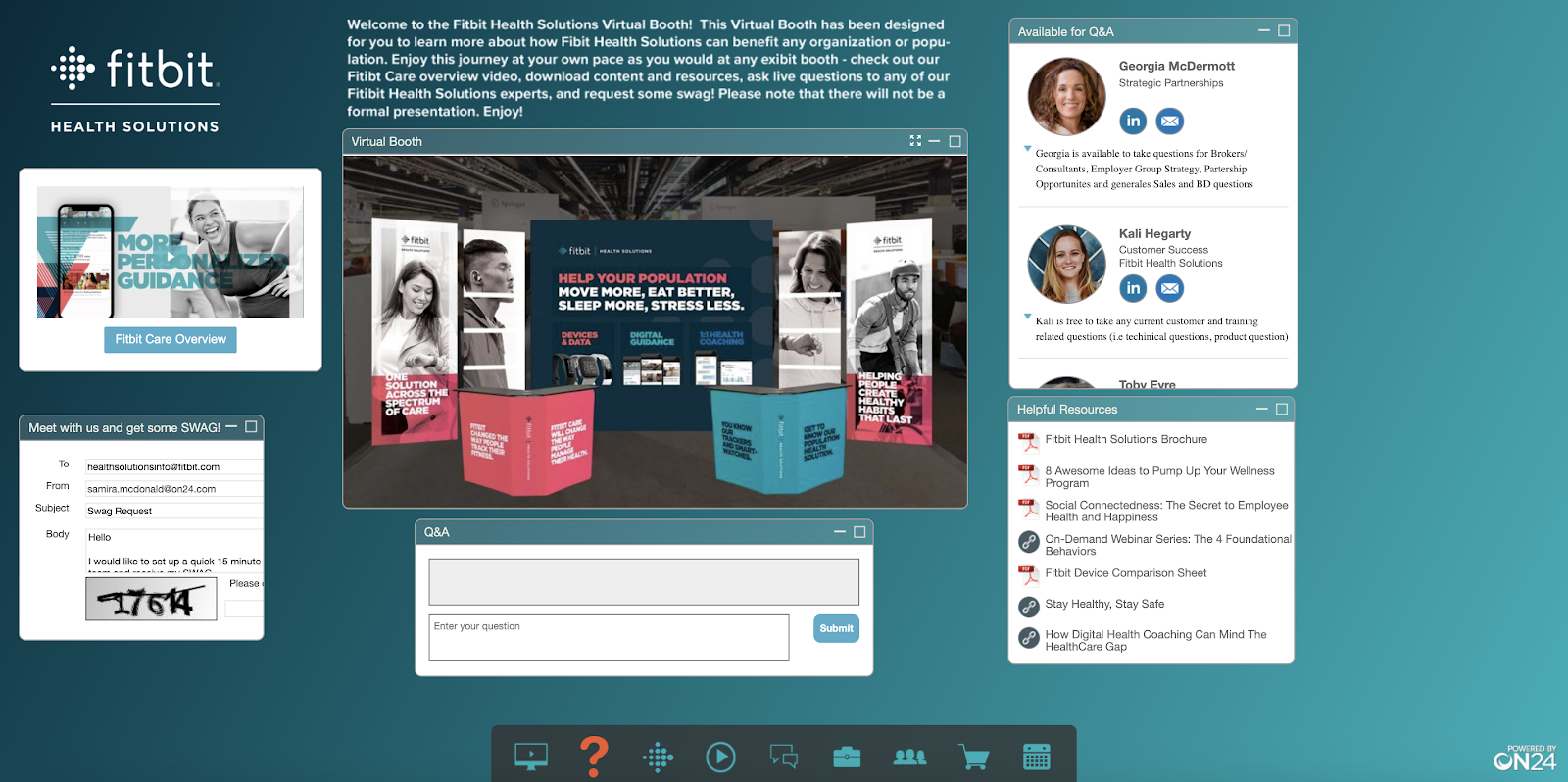
So, what did Fitbit do to make its rapid deployment of the Virtual Booth Experience happen? Here’s what the team had to share:
Rethinking promotional strategy on a tight timeline
Since the Fitbit team didn’t have a list of the trade show attendees, they had to rethink its promotional strategy. Eventually, the team decided to cast a wide net and focus on the target persona and audience they already have in their database. Since they only had two weeks to execute, Fitbit relied on two email drops and social posts to drive registrations.
Setting clear expectations
Most people who attend webinars are accustomed to a presentation or demo of some sorts. Since this experience was intended for folks to drop in and ask questions and engage on their own time, it was important that Fitbit set clear expectations for their registrants before they showed up to the virtual booth. They even included descriptions and images of the different engagement tools that the audience would experience at the booth.
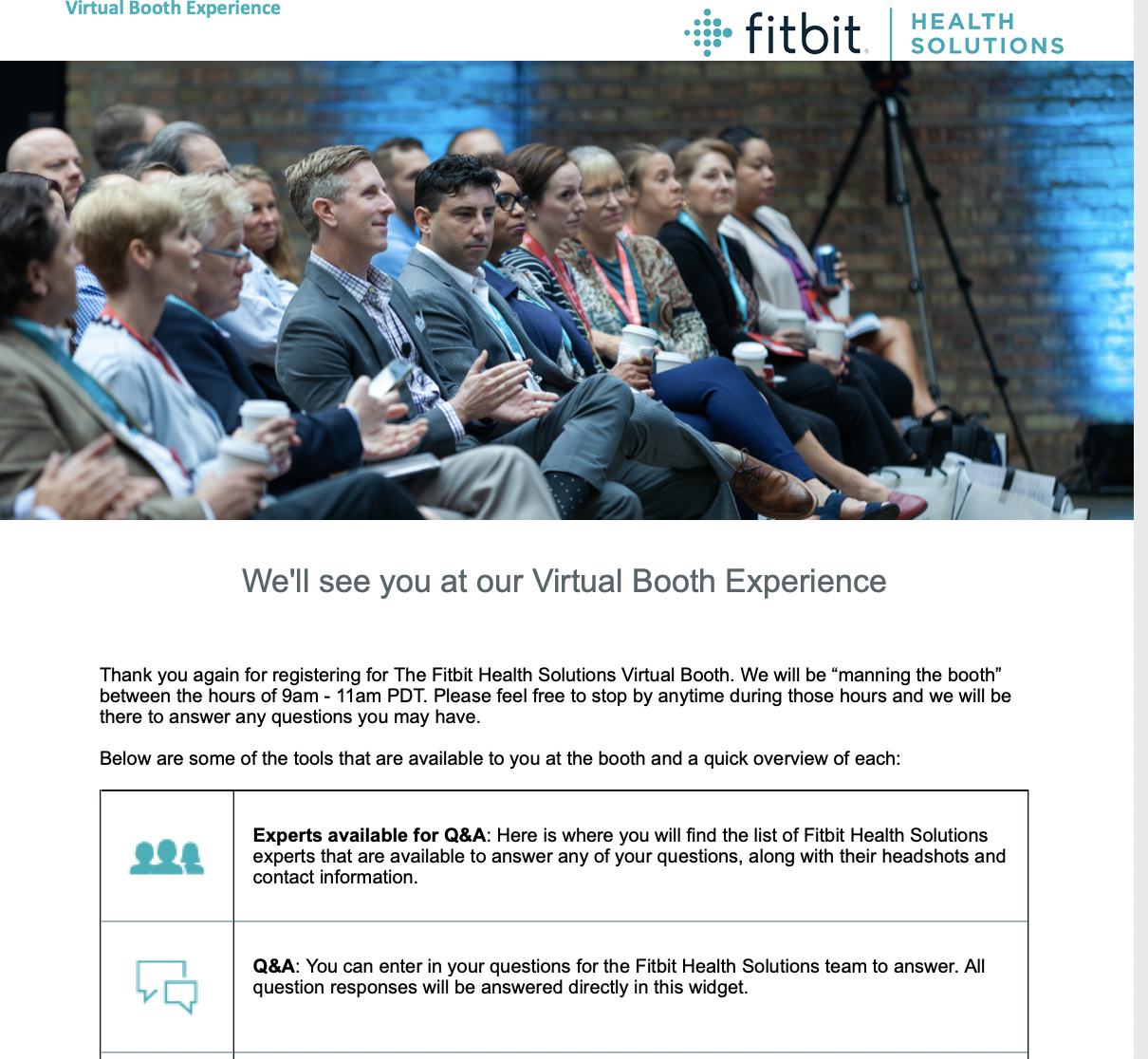
Nailing the audience experience
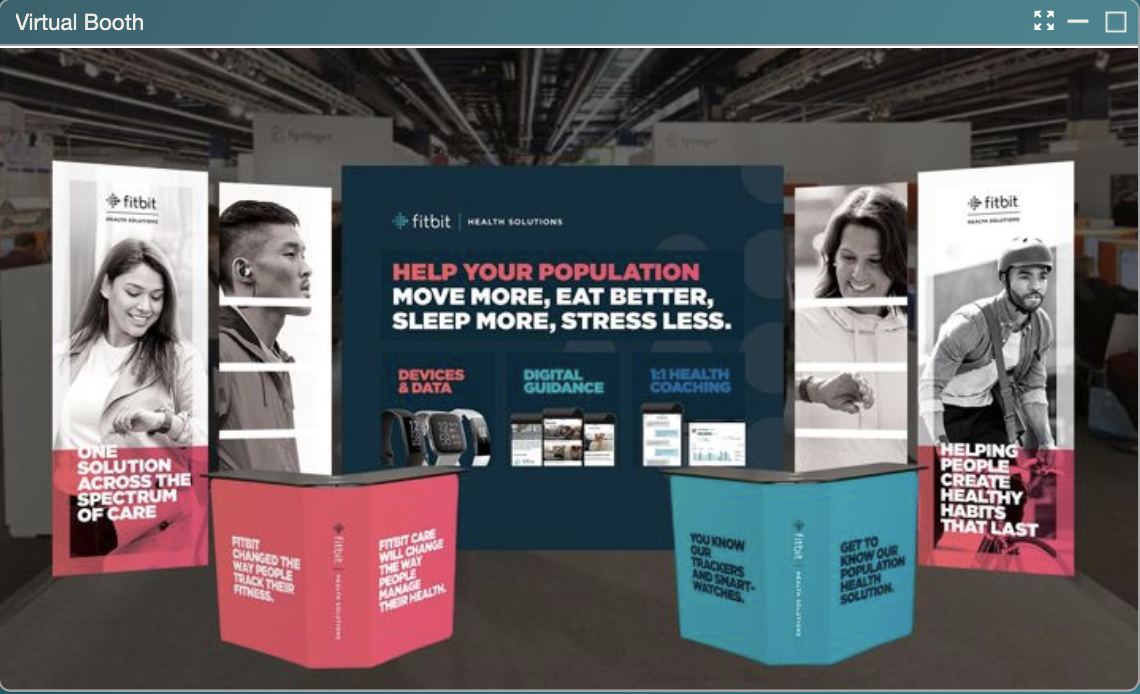
Fitbit needed to translate its in-person booth components into its digital experience to ensure its audience got the most from the experience. To achieve this, the organization made expert use of imagery.
- Booth Imagery. Fitbit repurposed the creative mockups planned for the actual trade show booth to create a virtual booth experience.
- Swag Giveaway. Like they would do at their physical booth, Fitbit offered an easy way for audience members to request swag in exchange for a quick 15-minute call with a Fitbit expert.
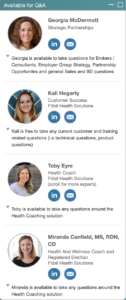
- Descriptive Speaker Bios. Each expert available to answer questions had a detailed description of the types of questions they could help answer. This aided in audience members getting answers to their specific questions fast.
Results: Fitbit was pleased to see more than 150 prospects register for the Virtual Booth Experience and saw more than 40 requests for a meeting with a Fitbit sales representative.
“With the help of the ON24 platform, by creating an engaging Virtual Booth Experience, we were able to salvage what would have been lost pipeline from the last-minute trade show cancellation.” – Tara Shirakh, Field Marketing Manager, Fitbit Health Solutions.
Fitbit’s rapid deployment of its virtual booth experience is a great example of what marketers can accomplish in a short amount of time with the ON24 platform.
How VertMarkets’ Virtual Pharma Expo Pushed Industry Boundaries
As the winner of the ON24 Experience’s Industry Award, VertMarkets successfully embraced digital transformation and pushed its industry forward with the first virtual event of its kind for online media companies.
Want to see what award-winning experiences look like? Click here to explore the ON24 Experience’s award-winner gallery.
Read on to learn more about how VertMarkets’ virtual event attracted, engaged and converted attendees.
How VertMarkets Ran Its Virtual Pharma Expo
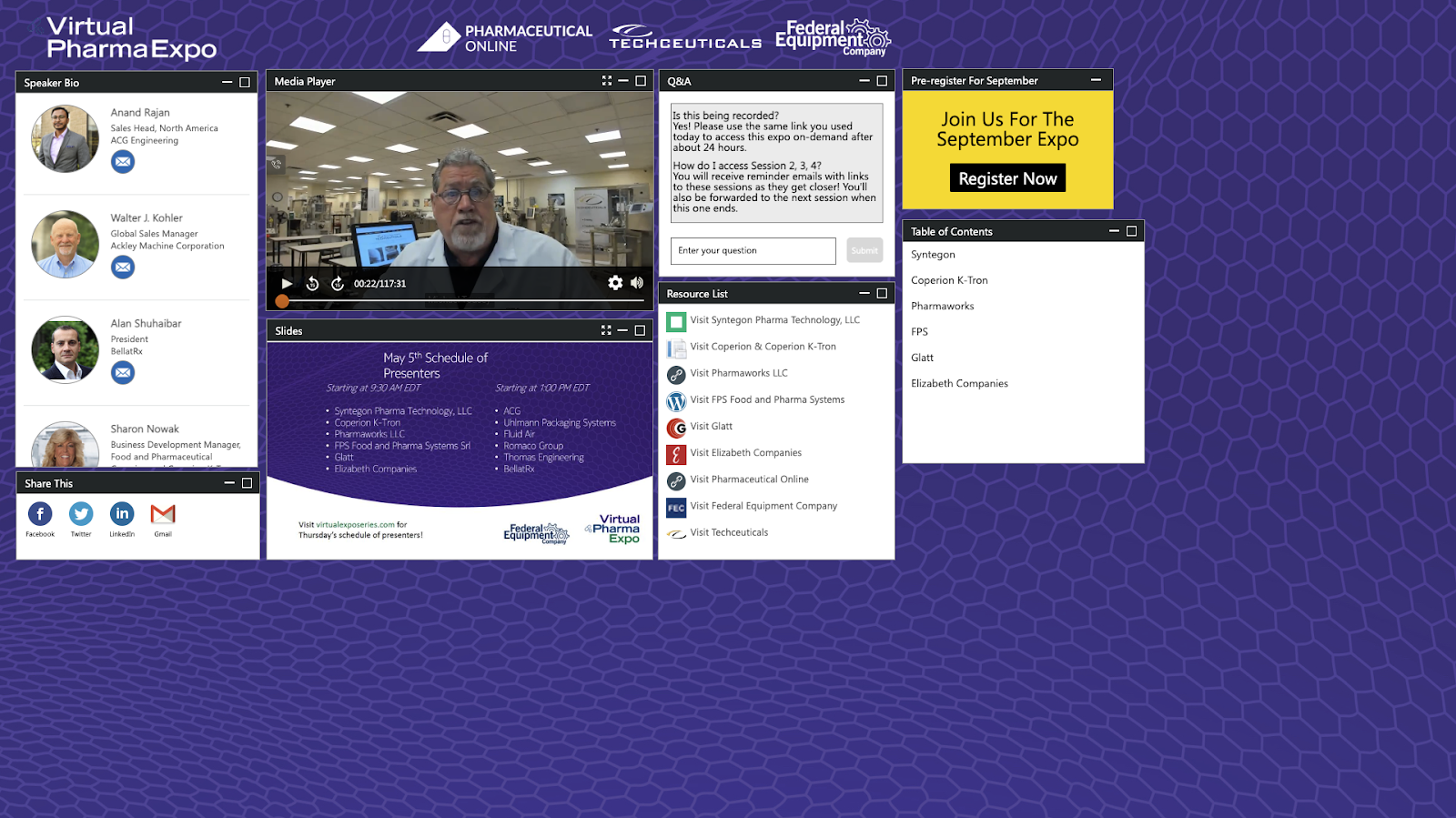
VertMarkets’ branded its Virtual Pharma Expo as the first ever virtual trade show for the pharmaceutical equipment industry. To make this event a reality, the team brought together pharmaceutical contract development manufacturing companies with an immediate capacity to develop and manufacture pharmaceuticals.
The event spanned three days with a two-hour session each day focusing on different pharmaceutical applications. This format allowed participants to choose which sessions they wanted to attend.
VertMarkets used ON24’s flexible webinar platform to break each daily session into 15-minute segments with different presenters, giving participants smaller, easily digestible chunks of content to engage with.
The company also selected a wide variety of presenters — ranging from South Korea, Australia, India, around Europe and across America — to speak at its event, providing attendees with a global perspective.
Why is engagement so important in modern digital experiences? Find out why — and the metrics you need to measure — in this blog post.
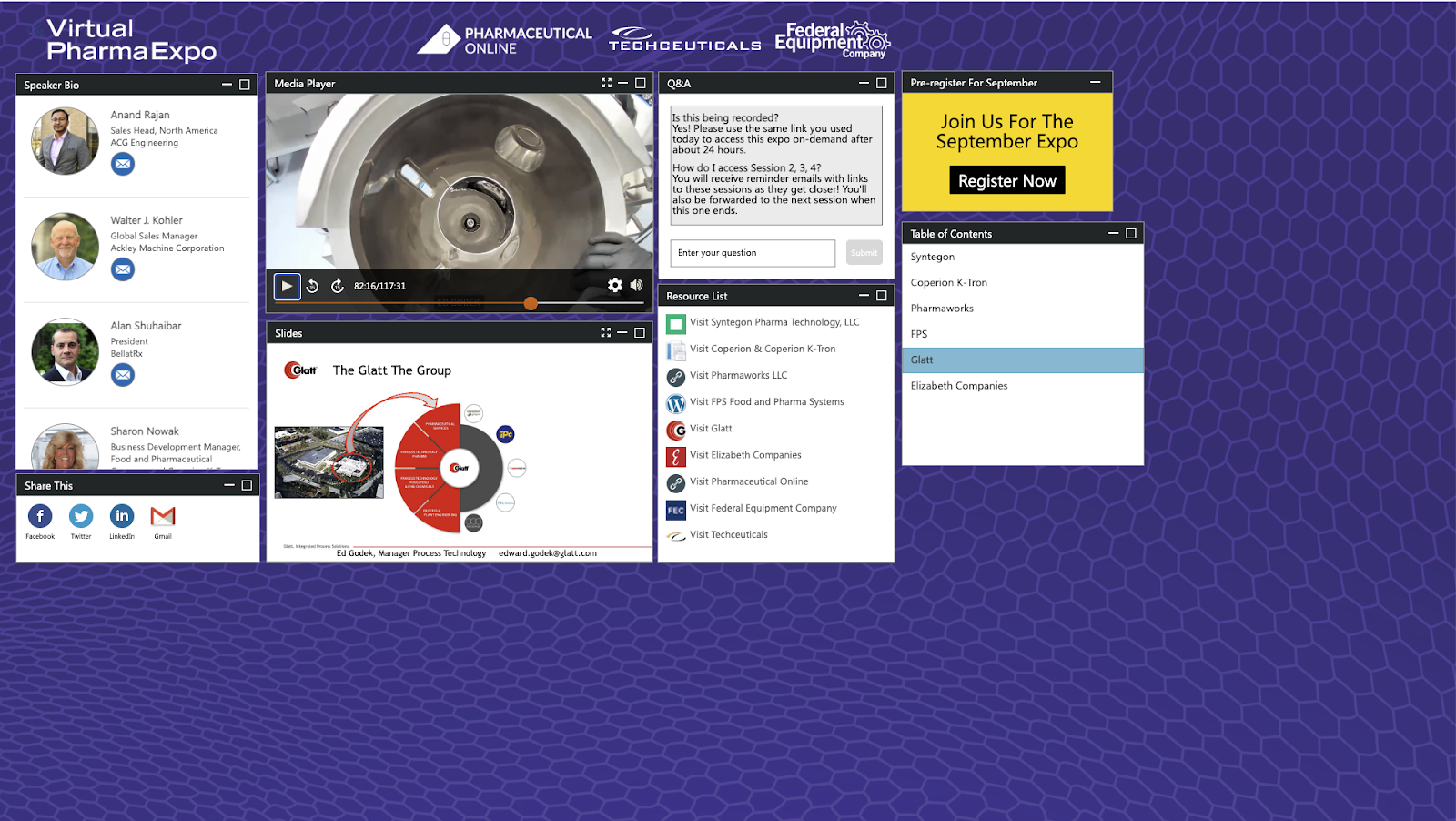
In addition to smaller presentation segments, VertMarkets also leveraged audience interaction tools through the webinar console. During the event, participants watched presenters through the media player with complimentary slides and could access a resource list, speaker bios, a quick share feature to social media, Q&A, table of contents and an embedded call to action to register for the next event in a few weeks.
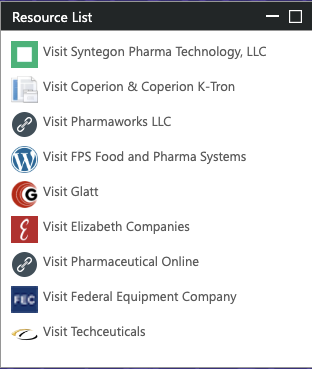
To help get participants to continue engaging with the event, VertMarkets used several engagement strategies. These included CTAs offering additional summits to register for, reminders of event-related activities through the Q&A console, valuable links embedded in each session’s resource list, polls, surveys and more.
VertMarkets Results
With the pharmaceutical industry acting as a frontline in the fight against COVID-19, providing relevant information about contract manufacturers with production availability was paramount. Any information had to be timely, relevant and with accurate to help all participants.
The event produced positive feedback for the team at VertMarkets and attendees were pleased with ON24’s ease of use and the event’s overall quality.
From VertMarkets’ perspective, the team is highly satisfied with the event’s professional appearance and performance. VertMarkets had such success that, even as physical events return, the company gradually incorporates virtual elements into its event strategy to reach the most people possible.
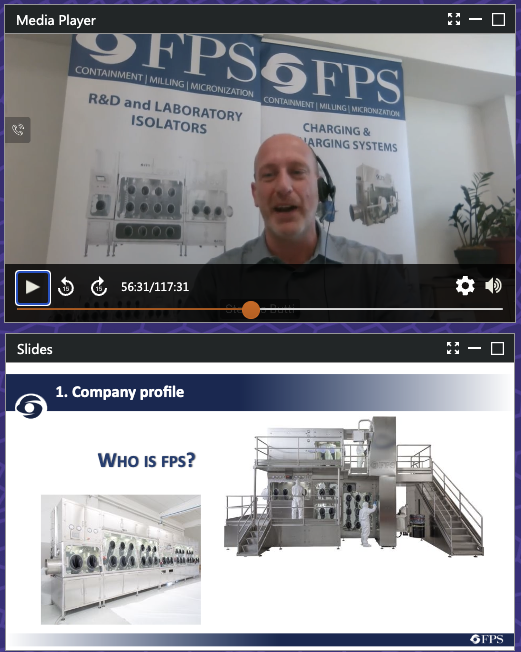
Since VertMarkets’ virtual trade show was such a success, it has gone on to turn its Virtual Pharma Expo into a quarterly series.
In addition to providing clients with an outstanding virtual event, VertMarkets has also collected valuable attendee insights through post-event surveys. With this information, VertMarkets can more easily connect would-be buyers with its suppliers — and demonstrate VertMarkets’ value and expertise as a leading B2B pharmaceutical publisher.