






Many marketers like to say they struggle to get networking off the ground at their virtual events. That’s not surprising. Virtual networking is hard because it often lacks the casual and interaction attendees are used to at in-person events.
Don’t worry. We’re here to help. This guide will provide you with the basic tips and tricks you need to know to facilitate virtual networking at your next event.
Is Virtual Networking Appropriate?

First, you need to understand that networking in a digital environment is inherently different than networking face-to-face. Attendees who are only too eager to grab a drink and gab at a physical conference may clam up when brought into a virtual networking environment.
What this means for you, the event practitioner, is that you need to put more thought into your plan for virtual networking. Establish goals for your networking session at the planning stage and ask yourself if it’s even necessary for the event you’re producing.
Questions to ask during planning can include:
- What are our goals?
- What do we want attendees to do?
- What’s the best way to drive attendees towards our goals?
- What format should this networking session take? (These can include: video, group chat, breakout rooms and more.)
By being results-centric at the start, you can more easily explore your engagement taxonomy and connect the tactics you need to take with the event type you should produce.
If your event is simply a presentation and little else, you will want your attendees to focus on the host. In this situation, consider holding off on networking until the presentation concludes or simply forgo a networking session overall.
By contrast, if your event is highly engaging by its nature, say an expert panel, then networking is a smart move. Formats can include:
- Group chat
- Breakout Q&A sessions
- Breakout rooms
- Expert-led roundtables
The best way to know when to use virtual networking is to plan. Make sure you slow down and plan your event out.
Be Transparent About Virtual Networking
When it comes to virtual networking, it’s important to be purposeful. Assuming your audience knows what to do, when and where to go to network is a recipe for failure.
Instead, give them a helping hand by clearly communicating what virtual networking options are available, where and what audiences need to do to engage in networking sessions.
There are a few ways to go about communicating your virtual networking session. Here are a few things to keep in mind:
Announce your networking session on social media.
Have an expert panel? A celebrity guest? Trivia? Announce it all ahead of your event on social media to gin up excitement and let your audience know what they can expect.
Bake networking into your design.
Sometimes networking is baked into the event format you’re running, like a virtual conference or summit — especially when supported by a versatile virtual event platform that enables real-time interaction and seamless attendee engagement. If this is the case, then make sure your design points to these networking opportunities. For example, you can design a webinar console to link directly to a networking session via CTA or, even, through invisible links.
Have your hosts promote virtual networking.
Your hosts can encourage audiences to engage with your brand. They need to. The same goes for networking. At the beginning of each virtual event, have your hosts call out virtual networking features and explain how to use them during your event.
A final note here: Don’t be afraid to let your attendees explore a virtual environment or network on their own. They should be encouraged to explore as much as possible.
Why? Because when attendees explore a virtual environment, you can engage them more, collect more first-party data and get a better picture of how interested they are in your solutions.
Bring Gamification Into Virtual Networking
Attendees — whether virtual or in-person — like to have fun. Gamification is an easy, effective way to craft a shared experience and encourage attendees to network.
One way to create virtual gamification is through badges and ranks. These can promote and uplift people who interact more, ask great questions in networking sessions or talk shop with sponsor representatives.
By bringing virtual networking into your gamification plans, you can create a sense of dynamic competition.
Plan for Networking Outside the Event
Your attempts to foster virtual networking do not need to begin and end with the digital experience platform you are running the event on. You can also create professional networking opportunities in areas that align with your own.
When preparing your event, remember to make good use of social media. Share, tag and promote speaker social media handles early and often.
If you’re up for it — and if you have plan for it — offer a Q&A or live chat on social media channels ahead of your event. Doing so can provide your team more engagement opportunities, create buzz around your event and connect with audiences that would otherwise miss your message.
Plan for Engagement
There’s a lot that goes into facilitating networking within a digital event. That’s why planning is essential. Sit down with your team to match your networking goals to the event you’re producing, then map out the attendee experience.
Done right, virtual events and virtual networking are a powerful combination. At ON24, we have some powerful tools designed to help organizations craft conversations to remember.
Four Ways To Host Virtual Networking Sessions with ON24
ON24 Forums
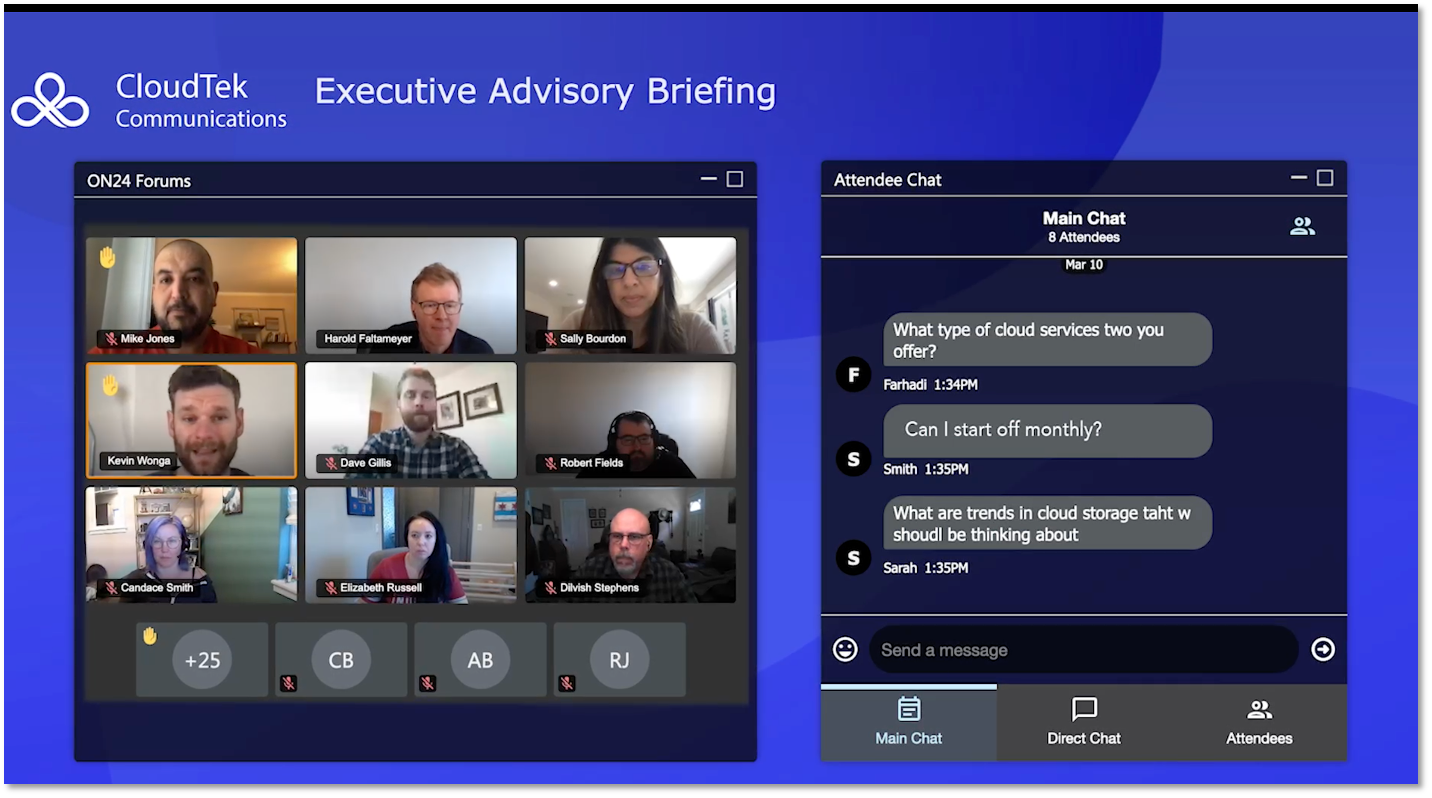
ON24 Forums gives marketers the tools to create a high-touch experience for high-value audiences. It’s an intimate environment specifically created to foster conversation among attendees and drive genuine one-to-one conversations.
Brands can use ON24 Forums for virtual networking in a variety of ways. You can have a moderated discussion among 50 participants (with up to 250 attendees listening in), an expert-led panel that then opens for a Q&A at the end, or a casual, open-ended chat in the chat room.
Attendees can also jump on camera to speak up and participate or directly message one another through Direct Chat.
Finally, hosts can encourage attendees to interact with each other and a presentation through embedded ON24 engagement tools, like polls, reactions, certifications and more.
ON24 Forums is ideal for:
- Expert-led trainings
- Executive roundtables and briefings
- Professional advisory experiences
ON24 Go Live
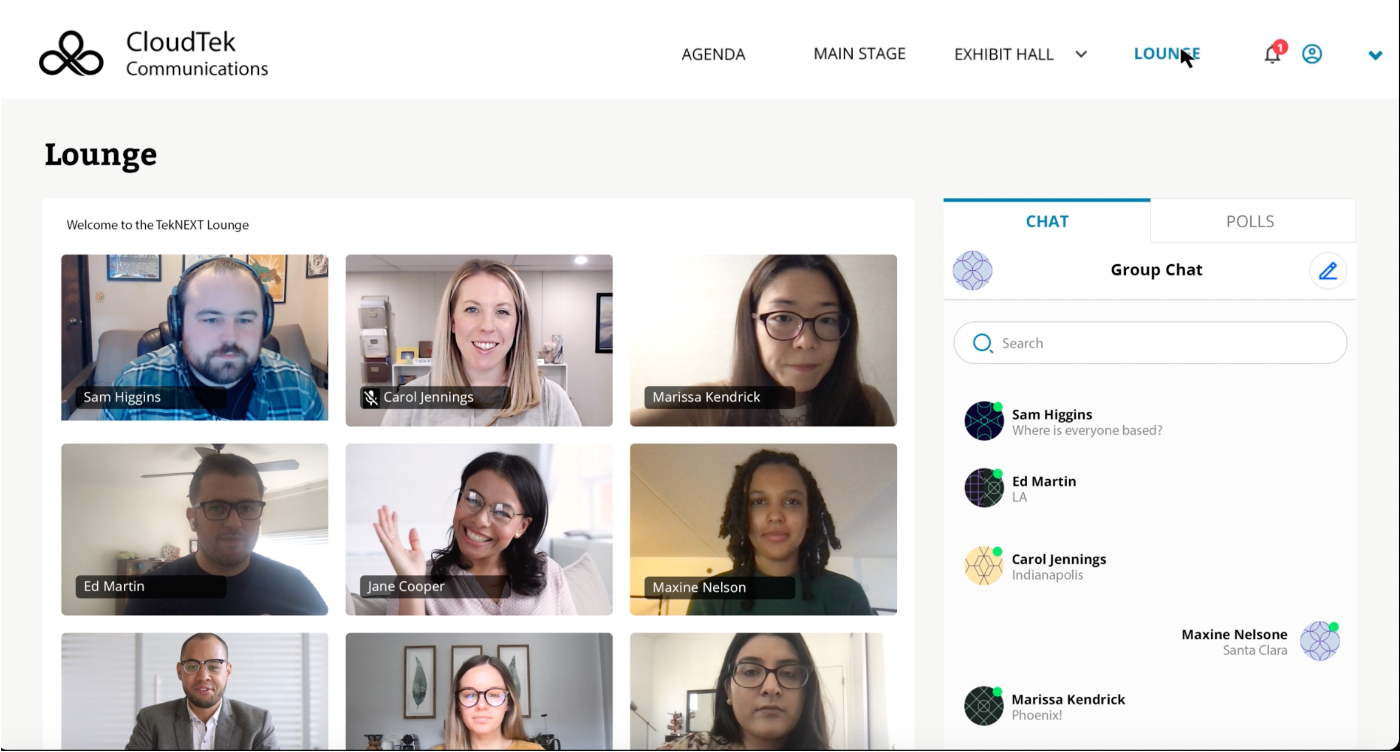
So what if you want to include virtual networking within a larger event? We have a few solutions for you to consider, like ON24 Go Live.
Go Live provides users with a one-stop shop for virtual event production. It allows you to quickly set up a professional event experience for large audiences with pre-built templates, including mainstage and breakout sessions, speaker’s galleries, exhibit halls, and networking environments.
Go Live also provides attendees with a sophisticated networking lounge. Like Forums, Go Live’s lounge allows visitors to jump in, chat on camera face-to-face, or hang out in an attached chatroom.
Unlike Forums, however, this networking feature is typically baked into a larger event, like a multi-day conference. Go Live also allows attendees to launch 1:1 video chats, letting participants hold side discussions.
ON24 Virtual Conference
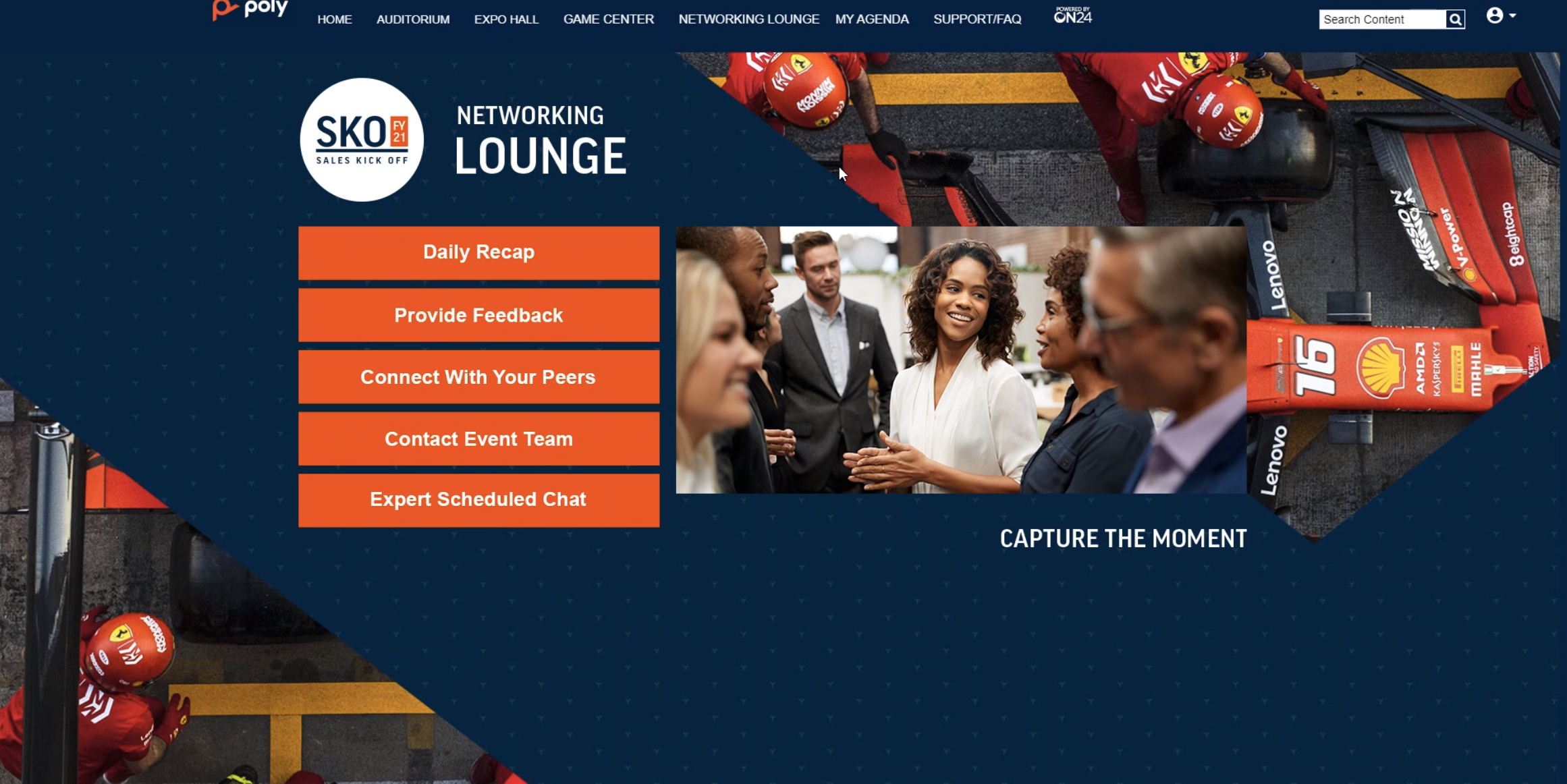
ON24 Virtual Conference is the tool to break out if you want to go all-in on a fully branded, customizable, multi-day event. Of course, this branding and customizability also extend to virtual networking.
With Virtual Conference, virtual networking opportunities and lounges are built-in. Participants can network through video and chat, yes, but because Virtual Conference embeds multiple events within it, you can also create unique networking experiences for each track or session you have through tools like ON24 Breakouts.
Speaking of which…
ON24 Breakouts
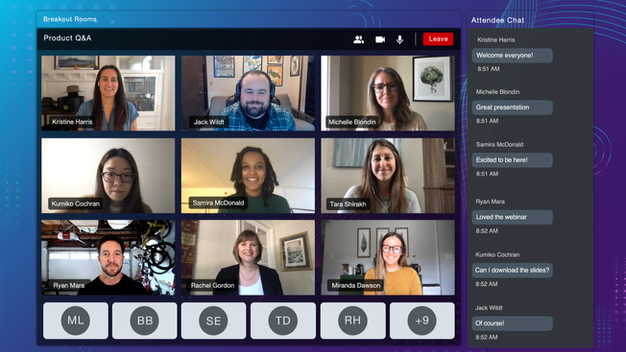
ON24 Breakouts is a unique tool that allows ON24 users to embed engaging networking opportunities directly into webinars, virtual conferences and more.
Breakouts brings hosts and attendees together in a two-way video, audio and chat environment. These breakout rooms can be just one-on-one engagements or pull in a whole webinar’s worth of attendees.
For networking, the implications are obvious. Participants can chat via text, jump on or off camera and discuss any topic. Hosts can also moderate breakout sessions so attendees can have a more intimate conversation with subject matter experts and more.
A Crash Course In Virtual Networking

We’ve already covered how to foster virtual networking at your next virtual event and virtual networking best practices for digital events. But how can you produce a great experience?
Well, let’s take a quick look at the basics.
What Are the Benefits of Virtual Networking?
Like in-person networking events, digital networking has a bevy of benefits brands need to consider. These events connect professionals to peers, allow audiences to share ideas and provide brands an opportunity to position themselves as thought leaders.
But, unlike in-person networking, virtual networking events possess a few additional advantages to a brand. For example, they:
Provide in-depth, trackable engagement data. Digital means data, and the most valuable data for marketers today is engagement data. Virtual networking allows brands to interact with participants and see what they’re interested in.
Just as important, virtual event solutions empower brands to evaluate engagement across a visitor’s history with a brand. That means being able to see how an individual lead interacts with an organization through multiple events and throughout their buyer’s journey.
Give partners another reason to, well, partner. Partners are great at amplifying events. But attracting partners isn’t always easy. Offering to share engagement data and leads for sponsoring or partnering on a virtual networking event is a lucrative lure.
Send more engagement insights to sales. Marketing and sales teams know that deals are driven on data. Everything, from questions asked, links clicked on to even time spent in a special environment, helps organizations better understand a lead’s propensity to make a deal.
Virtual networking events provide organizations with *a lot* of data. They’re great opportunities to understand common pain points within an industry, see any questions an account has asked and generally get more information that will help leads get to “yes.”
There are a lot of ways you can make virtual networking a reality. But ON24 provides your team with a native experience that seamlessly moves audiences from one experience to another. Not only that, but all of these experiences provide you with unique insights into how attendees engage with your content through engagement tools, chat and more.
If You’re the Host
If you’re hosting the webinar or virtual event, there are a few things you should consider, like if virtual networking is even appropriate for your event.
If you’re hosting a webinar with a presentation or discussion with speakers, you probably want participants to pay attention to your content and focus on networking later.
In this instance, announce that networking opportunities will be available before or after the webinar and activate or deactivate relevant tools as appropriate. You can still encourage networking outside of the presentation timeframe by offering access to social channels, direct chats or contact info in pre and post-webinar communications.
If You’re the Attendee
If you’re attending a webinar or virtual event and want to capitalize on webinar networking opportunities, there are a few things you can do to make it successful.
When you register for the event, look at the page and email confirmation to see what options are available. Did the host include links to social channels? Are there hashtags where you can find other participants? Did they arrange an afterparty?
Many virtual events are aiming to mirror in-person conferences and tradeshows, so, usually, they’ve planned ways for people to connect. Recently, we’ve seen organizations host B.Y.O.B. happy hours at the end of their activities for the day, Zoom dance parties with a live streaming DJ, virtual booth experiences where participants can “stop by” and chat with vendors and even vendor-specific channels where participants can reach out to start a conversation.
These are great examples of opportunities that are available to you if you’re interested in webinar networking.
If you don’t see anything built into the event, start by exploring the hosts’ social media channels to see if they’re promoting the event and if others have commented about attending. If you don’t see anything, get the conversation going by commenting on a recent post and ask who else is attending.
If you can’t find any evidence of networking opportunities in communications from the hosts or social channels, don’t hesitate to email before the event and ask. It may have slipped the host’s mind or it may be something they’re still planning and are going to announce shortly for registered attendees.
In addition to these tips, you can also ask about hashtags and networking during the event’s Q&A, or on the chat tool with other participants. In the chat tool, you could share your contact info to other participants and encourage them to reach out to you after the event. Don’t forget to connect with the hosts and speakers too.
Tools for Networking

If you’re looking to build webinar networking opportunities into your event, there are several tools you can use to make it happen. When planning an event, remember to consider tools within the webinar platform and outside of it.
In the Webcast Environment
When hosting a webinar or virtual event, the right virtual event platform can provide built-in tools that make it easy to foster meaningful networking among participants. When you’re in the planning phase for your event, consider whether you want to offer webinar networking, when you want it to be available to participants and how it will work with the content and structure you envision for your event.
The social media and live chat widgets are always popular choices for virtual networking, but we also encourage using the speaker bios as a way for participants to connect with the hosts. If the speakers are willing, we like to include their Twitter handles and LinkedIn profiles in their bio so participants can easily find them.
Whether you choose to encourage networking in webinars amongst participants or not, be aware that the tools you offer may be used for this regardless of your intention. Sometimes the live chat function can go in a direction you didn’t anticipate, or you may find that participants aren’t interacting with the presentation the way you want because they’re interacting with each other.
Outside the Webcast Environment
In addition to offering networking capabilities within the webinar platform, there are many things you can do to also encourage networking outside the live presentations. This starts with the planning phase and what you’re going to include in your registration page and marketing emails.
Along with the event details and a summary of the topic, include easy access links to your social media pages so registrants can easily find you and other like-minded colleagues. If you have speakers, include their bios, contact information and social pages too.
If your event has a specific name or is part of a series, consider creating a consistent design and hashtag so conversations can be easily collected across your different social platforms. Not only does this make it easier for you to see who’s talking about your event and what they’re saying, but it also makes it easy for participants to see who’s attending and interact with each other.
Make your next meet’n’greet seamless and engaging — even at a distance. Learn how you can create digital networking opportunities in this on-demand webinar. [Watch Now]
Within your social media platforms, there are several options available to you. Organize a “Twitter Chat,” a moderated conversation about a specific topic at a predetermined time with a predetermined hashtag. Hootsuite offers a solid “How To” article here. Facebook also recently started Messenger Rooms, which allows up to 50 people to join a group video chat. You can find detailed instructions in this article from The Verge.
Outside of traditional social media channels, you can also set up virtual meetings and hangouts through programs like Slack, Zoom, Discord and Google Hangout. All of these programs offer video chatting services, and a few are even free to use. We recommend get-to-know-you coffee meetings, virtual workout sessions like Drift did with their RevGrowth Summit or something a little more fun like a Zoom Dance Room.
In particular, Slack is used by many businesses and offers features like event- and company-specific channels where participants with a link can join specific groups. You could even host live events on Slack and direct people there after the live presentation.
Parting Tips for Facilitating Networking
Give even large events a personalized touch
Citrix made the decision early on in 2020 to commit to no in-person events for the year, a decision continuing into the first half of 2021. So, like many companies, its tactics in approaching events had to change significantly.
As Virginie Maillet (High-Touch Marketing Manager at Citrix) has seen, virtual experiences can be hugely successful when applied to ABM programs and targeted events. But Citrix learned lessons about facilitating large virtual events during its recent EMEA Work Summit, with 3,000 registrants.
One lesson was the importance of crafting relevant content for different personas. This made it so attendees could easily navigate an experience and drive more positive outcomes.
Another lesson was being imaginative with the format, and understanding that presentations might not always be what attendees want – videos, podcasts and gamification are all great ways to change up an experience to make it more personable and engaging.
Remember the human and create one-to-one conversations
A virtual experience should facilitate a one-to-one conversation. If this isn’t literally possible, it should mimic the connection and human element of such a conversation. Automation and paid channels are great for achieving at scale, but smaller events that aim to recreate networking opportunities or a high-touch experience need to make attendees feel more special and valued. If you are interested in learning more about how to improve your virtual events, why not take a look at our ultimate virtual events guide?
Book a demo today learn more about how ON24 can power your next virtual networking experience.